Build the ultimate tools for your WordPress site
Create whatever your team actually wants. Power it with live WordPress data using the Connector for WordPress.

Build on your WordPress data, not around it.
Reads your content and store data
Your live WordPress data. Posts, pages, media, products, and orders, powering any tool you build.
Updates and publishes from one place
Describe the change. Sticklight updates posts, prices, and orders, synced back to WordPress.
Your WordPress roles, respected
Every tool inherits your WordPress users and roles. Publish, and access follows.
Connected in one step
Add the Connector to WordPress in one step. Paired instantly - no proxies, no custom flows.
Three tools to build first
WordPress powers over 43% of the web. Connect it to Sticklight and build the dashboards, apps, and pages that fit how your team actually works.

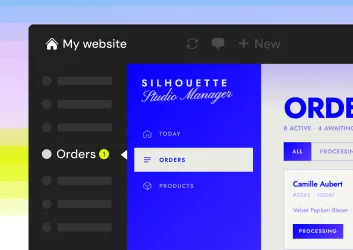
Run your store from your phone
Create a mobile-friendly manager for your WooCommerce store. Update prices, adjust stock, and change order status on the go, with everything syncing back to WordPress.
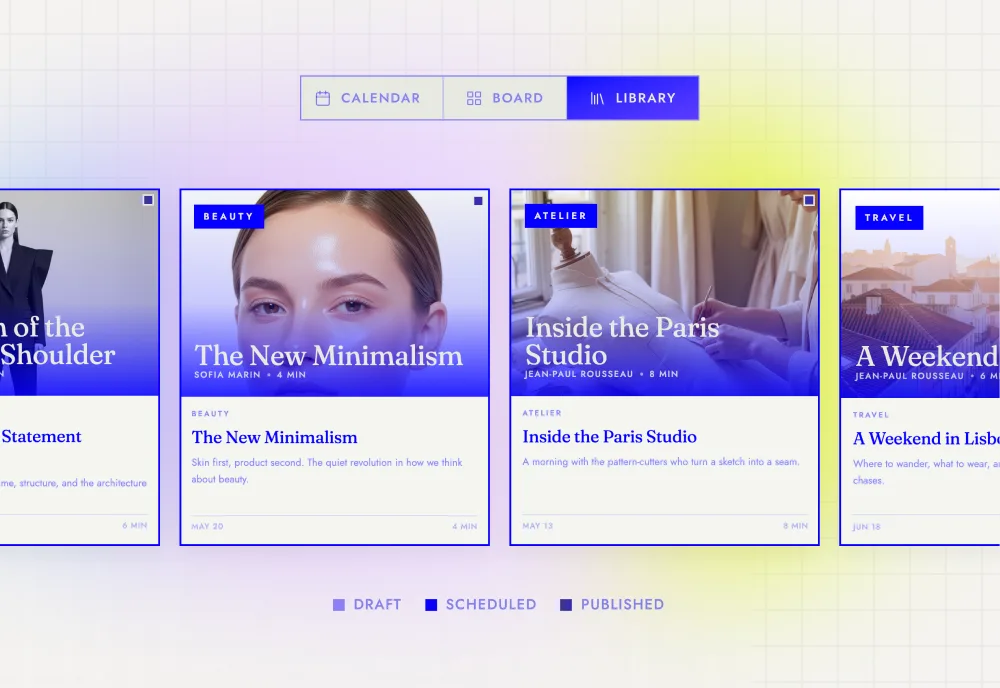
Design a custom editorial calendar
Build a shared pipeline for your marketing team. Track what's published, scheduled, or in progress across custom fields and content types—all beautifully organized in a single view.

Turn your catalog into a quiz
Design an interactive quiz visitors can take instantly. Pull live products directly from your WordPress database to power instant product discovery and client onboarding.
Two ways to get started
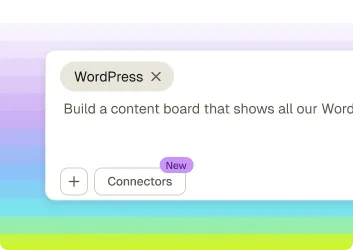
Build from scratch
- 1.Open Connectors, select WordPress, and add it to your project.
- 2.A WordPress connector tag appears in your prompt box.
- 3.Write your own use case from there and start building.
Start with a use case
- 1.Open Connectors, select WordPress, and pick a pre-built use case.
- 2.The connector tag and a starter prompt both load into your prompt box.
- 3.Tweak the prompt if you like, then build.
Connect your site. Start building.
Your WordPress content, ready to power the tools you actually want to use.
No credit card required. Works with any WordPress site.